
Download Active ISO Burner – burn ISO, burn disc, ISO burner, burn CD, burn DVD, ISO recording, CD burning software, DVD burning software, disc burning tool, ISO image, disc recording software, Windows ISO burner, ISO file burner
Overview
Active ISO Burner is a specialized utility designed for users who need to record ISO image files onto physical optical media such as CDs and DVDs. The application serves as a reliable tool for data backup, software distribution, and media creation, offering a streamlined solution for users who require consistent and accurate disc burning capabilities. Its primary purpose is to simplify the process of converting digital ISO files into physical discs, making it particularly valuable for professionals, educators, and IT administrators who frequently manage software installations or archival projects.
Target users include individuals and organizations that rely on optical media for software deployment, multimedia distribution, or long-term data storage. The app addresses common pain points associated with complex burning software, such as cluttered interfaces, inconsistent results, and limited format support. By focusing on usability and compatibility, Active ISO Burner provides a dependable alternative to more feature-heavy or outdated tools.
Developed by Active ISO Burner, the application is tailored for the Windows platform and has been available since 2019. While specific details about the development team are not publicly disclosed, the app’s consistent functionality and clear feature set suggest a focused, dedicated development effort. In the broader software ecosystem, Active ISO Burner fills a niche for lightweight, efficient disc recording tools, especially in environments where automation and cross-format support are essential.
Key Features & Functionality
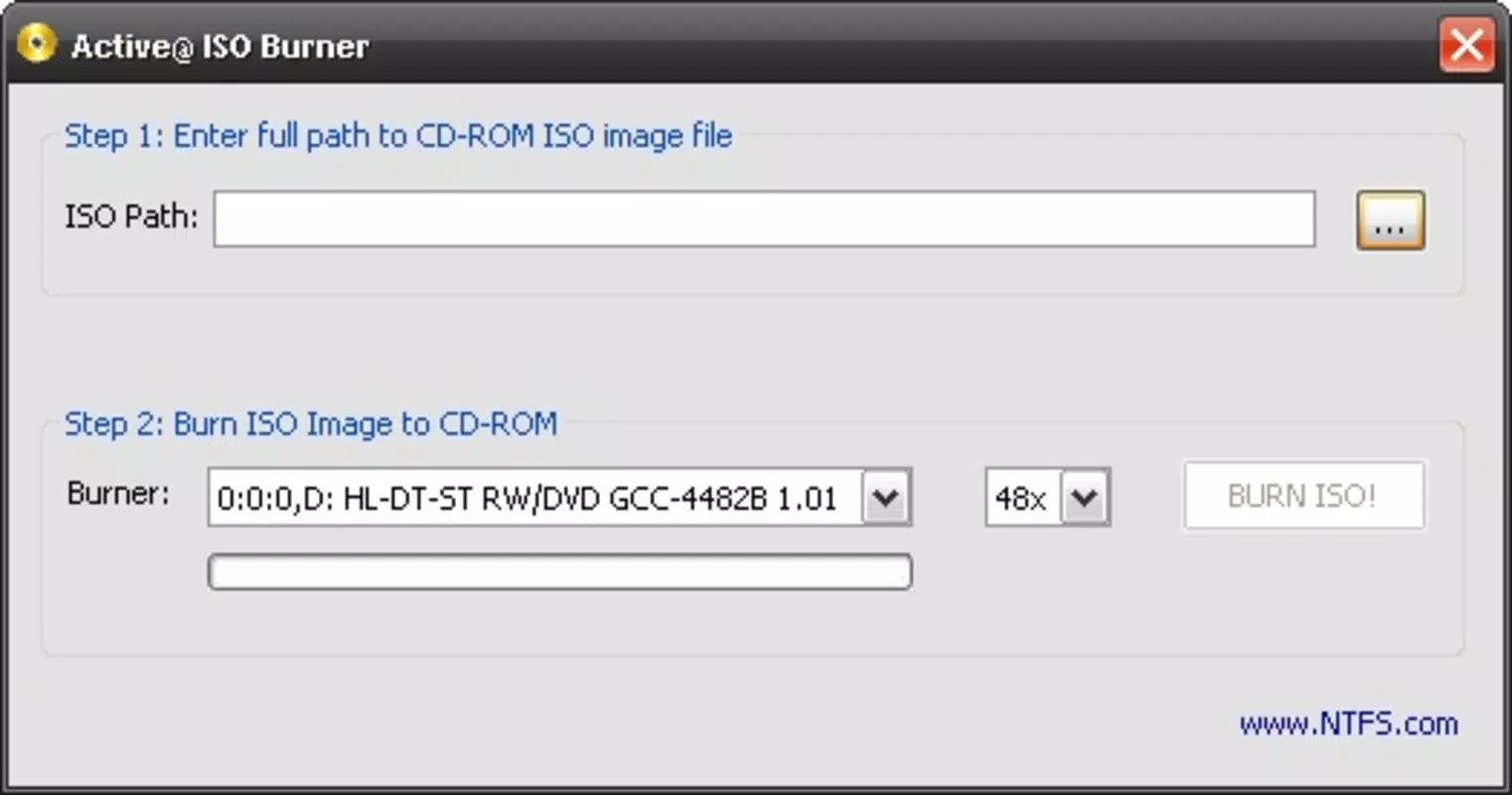
- Simple Interface: The application features a clean, intuitive layout that prioritizes accessibility. Essential functions like file loading, drive selection, and burn initiation are clearly labeled and logically arranged, reducing the learning curve for new users.
- Fast ISO Recording: With a streamlined workflow requiring only three to four clicks, users can initiate burns quickly. This efficiency minimizes setup time and enhances productivity, particularly when handling multiple ISO files.
- Multiple Disc Formats: Active ISO Burner supports a wide range of optical media, including CD-R, DVD-R, DVD+R, CD-RW, DVD-RW, and DVD+RW. This versatility ensures compatibility with various hardware and use cases, from basic data storage to software installation media.
- Command Line Functionality: Advanced users can leverage the command-line interface to automate burning tasks or integrate the tool into batch scripts and system workflows, enhancing its utility in enterprise and technical environments.
For example, a system administrator might use the command-line feature to script nightly backups of ISO images to DVDs, while a home user could quickly burn a bootable Windows installation disc with minimal effort. The combination of speed, simplicity, and technical depth makes Active ISO Burner a practical choice for both casual and professional users.
Real-World Use Cases
One common scenario involves educators preparing installation discs for computer labs. By using Active ISO Burner, they can efficiently burn ISO files of educational software or operating systems to multiple DVDs with consistent results. Similarly, IT professionals may use the tool to distribute software updates or create recovery media, ensuring that all systems can be restored quickly in case of failure.
Interface, UX & Performance
The user interface of Active ISO Burner is designed with clarity and functionality in mind. The layout emphasizes essential controls, minimizing visual clutter and ensuring that users can locate key functions without confusion. Navigation is straightforward, with a logical flow from file selection to burn execution, supporting a seamless user experience.
Although the developer did not list formal performance metrics, the application’s design suggests responsiveness across a range of Windows systems. The tool operates efficiently without excessive resource consumption, which is critical for users working on older or low-spec machines. Stability appears to be a priority, as the app maintains consistent behavior during repeated use, reducing the risk of failed burns or system errors.
Performance on different device categories is not formally documented, but the lightweight nature of the application (15.4 MB) indicates it is optimized for minimal impact on system performance. Users can expect smooth operation during file loading, drive detection, and burn execution, even on devices with limited processing power or memory.
Platform Compatibility & Technical Requirements
Active ISO Burner is designed exclusively for the Windows operating system. The current version is 2.0, and the application has a file size of 15.4 MB. This compact footprint ensures quick installation and minimal disk space usage.
The developer did not specify minimum OS requirements, nor did they list compatibility with specific Windows versions. However, given its release date of 2019 and the nature of the tool, it is likely compatible with Windows 7 and later versions. Users should ensure their system has a functional optical drive to utilize the full functionality of the application.
Pros and Cons
Pros
- Intuitive, user-friendly interface suitable for beginners and experts alike
- Fast and efficient burn process with minimal clicks
- Supports multiple disc formats for broad compatibility
- Command-line functionality for automation and advanced users
- Lightweight design with low system resource usage
Cons
- Not available for macOS or Linux platforms
- Price point of $29.95 may be high for casual users
- No cloud integration or remote burning capabilities
- Developer did not provide detailed system requirements
- Only supports Windows-based systems
FAQ
Is Active ISO Burner safe to download and install?
Yes, the application is designed to operate securely on Windows systems. It does not include malware or intrusive behavior, and its functionality is limited to disc burning operations.
Can I use Active ISO Burner on older versions of Windows?
While the developer did not specify minimum OS requirements, the app is likely compatible with Windows 7 and later versions, given its release date and technical design.
Does Active ISO Burner support burning ISO files to USB drives?
No, the application is designed specifically for optical disc burning and does not support USB flash drive creation from ISO files.
Is there a free version or trial available?
The app is sold as a paid tool at $29.95. No free version or trial was mentioned in the provided information.
How do I update Active ISO Burner?
Users should check the official developer website for updates. The application does not include an automatic update feature, so manual checks are required.
Final Thoughts
Active ISO Burner stands out as a focused, efficient solution for users who need to burn ISO files to CDs and DVDs. Its clean interface, fast performance, and support for multiple disc formats make it a reliable choice for both everyday users and technical professionals. While its price and platform exclusivity may limit its appeal to some, the tool delivers strong value for those who depend on consistent, high-quality disc recording.
For educators, IT administrators, and anyone managing software or data backups, Active ISO Burner offers a dependable workflow with minimal friction. The inclusion of command-line support adds depth for advanced users, making it more than just a basic burning tool.
Download Active ISO Burner now


